

Effective January 1, 2026
The City of Fishers has enacted a rental registration ordinance that requires all single-family rental properties, including townhomes and platted condominiums, to be registered and limits rentals to 10 percent per subdivision.
Unregistered properties are subject to a $250 fine, and the City’s 10 percent rental cap per subdivision is enforced. All rentals must also comply with applicable HOA covenants rental restrictions, which may be more restrictive.
On Monday, April 21, 2025, the Fishers City Council voted unanimously to implement the Home Rental Registration & Permitting Program via Fishers Code of Ordinances Chapter 163.
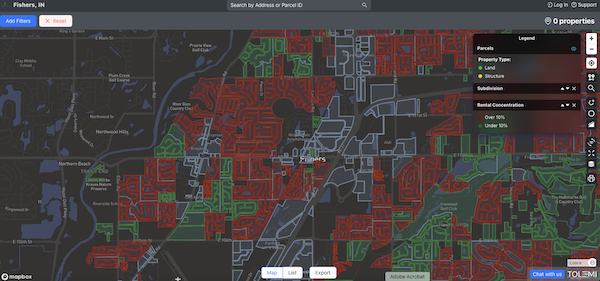
Rental Capacity Map
See the Rental Capacity Map for current rental percentages by subdivision.
- Green: below the 10% cap and eligible for more rentals.
- Red: above the 10% cap and no longer have availability for additional rentals.
Please be aware that HOA covenants or neighborhood rules may impose stricter rental limits than those enforced by the City.
How to Register Your Rental Property
The City of Fishers uses an online software system called Slate by Tolemi to register single-family, long-term rental properties.
For a visual step-by-step guide to register your rental property, click here.
How to register:
- Step 1: Click here to access the registration software site
- Step 2: Create an account by clicking “Start” or use existing credentials to log in by clicking “Sign In.”
- Step 3: Once logged in, select the blue “Start New” button and select “Rental Registration.”
- Step 4: Search for your property address using the street address or parcel ID of your rental property. Select the address you want to register and select “Next.”
- To add multiple properties, search for additional addresses and follow the prompts to complete. Once all addresses have been added, select “Next.”
- To add units to your property address, select “Add Unit” and follow the prompts to complete.
- Step 5: Complete the prompts in the following “Property Information” step
- Step 6: Add or Assign Property Owner. Select “Create New” from the drop-down box to add a property owner or agent to act on behalf of the owner associated with the property or properties. Complete the form(s) and follow the prompts to assign the property owner to the related properties.
- Step 7: Review submission and select “Submit.”
If you have yet to acquire a property and would like to convert it into a rental, please submit for a pre-approval here. If the subdivision the property you are looking to acquire is in has more availability, you will be granted a pre-approval, which will hold your place for 60 days to allow you to acquire the home and register your property.
PLEASE NOTE: Pre-approval is not in place of registration. Once the property has been acquired, you will need to register your rental by following the above process in order to obtain the permit.
Registration FAQs
About the Program
In 2022, the City of Fishers released a public report that found it imperative to the City’s long-term vibrancy to maintain high-quality rental stock as many older homes that are currently owner-occupied enter the rental market.
Considering this trend and the increasing numbers of out-of-state ownership (47% of all SF rentals) and institutional investor ownership (25% of all SF rentals), the City Council passed an ordinance that requires registration of every single-family rental property within Fishers City limits as well as enforce a 10% maximum cap of single-family rental properties.
What are the goals of this Ordinance?
Ordinance FAQ’s
Rental Registration Enforcement Process
Rental Registration Enforcement Process
The City of Fishers uses a step-by-step enforcement process to address unregistered long-term rental properties. Enforcement depends on whether a property is located in a subdivision that is below or above the City’s 10 percent rental cap.
First Violation
Day 0: Courtesy Notice
A courtesy notice is sent to the property owner.
- This is not a violation
- No fines are issued
- Property owners have 30 days to take corrective action
If your subdivision is below the 10 percent rental cap:
- Register the property as a long-term rental through Tolemi
If your subdivision is above the 10 percent rental cap:
- Stop operating the property as a rental
- Notify the Department of Community and Economic Development that rental activity has stopped
- Failure to do so may result in:
- $250 fine for failure to register
- $1,000 fine for operating without a permit
If you believe your property was identified in error or qualifies for an exemption:
Complete the correction or exemption form by visiting Fishersin.gov/rentalcorrection
Day 31: Notice of Violation
If no action is taken within 30 days, a formal Notice of Violation is issued.
Fines issued at this stage total $1,250:
- $250 for failure to register
- $1,000 for operating without a permit
If your subdivision is below the 10 percent rental cap:
- Pay the $1,250 fine
- Either:
- Register the property as a rental through Tolemi, or
- Stop operating the property as a rental and notify the City
If your subdivision is above the 10 percent rental cap:
- Pay the $1,250 fine
- Stop operating the property as a rental and notify the City
Important:
Fines must be paid even if you later come into compliance.
Payment options:
- Money order or cashier’s check referencing the record number
- Online payment by e-check or credit card
If you believe your property was identified in error or qualifies for an exemption:
Complete the correction or exemption form by visiting Fishersin.gov/rentalcorrection
Day 60: Referral to Law Department
If the fine is not paid, an appeal is not filed, or corrective action is not completed within 30 days, the case is referred to the Law Department to begin enforcement.
Day 75: Law Department Warning Letter
The Law Department sends a letter giving 15 additional days to comply before legal action is filed.
Day 90: Legal Enforcement Action
If compliance is still not achieved, the City may file enforcement action in:
- Fishers City Court, or
- Hamilton County Court, depending on the issue
Following a court order, the City may file judgment liens.
Second & Subsequent Violations
After a court order, future violations move directly to enforcement.
Day 0: Immediate Notice of Violation
No courtesy notice is issued.
Fines range from $5,000 to $7,500
If your subdivision is below the 10 percent rental cap:
- Pay the fine
- Either:
- Register the property as a rental through Tolemi, or
- Stop operating the property as a rental and notify the City
- 30 days to pay the fine and comply
If your subdivision is above the 10 percent rental cap:
- Pay the fine
- Stop operating the property as a rental and notify the City
- 30 days to pay the fine and comply
Day 30: Referral to Law Department
If the fine is not paid, an appeal is not filed, or corrective action is not completed, the case is sent to the Law Department.
Day 45: Law Department Warning Letter
A letter is sent giving 15 days to comply before legal action.